Know your real profit. On every sale.
For makers and small shops selling on Etsy, Shopify, at markets or wholesale. See what you really keep after fees, materials and expenses, ready for tax time.
No sign-up and no card needed for the demo · $27 launch price, paid once · goes up to $37 soon
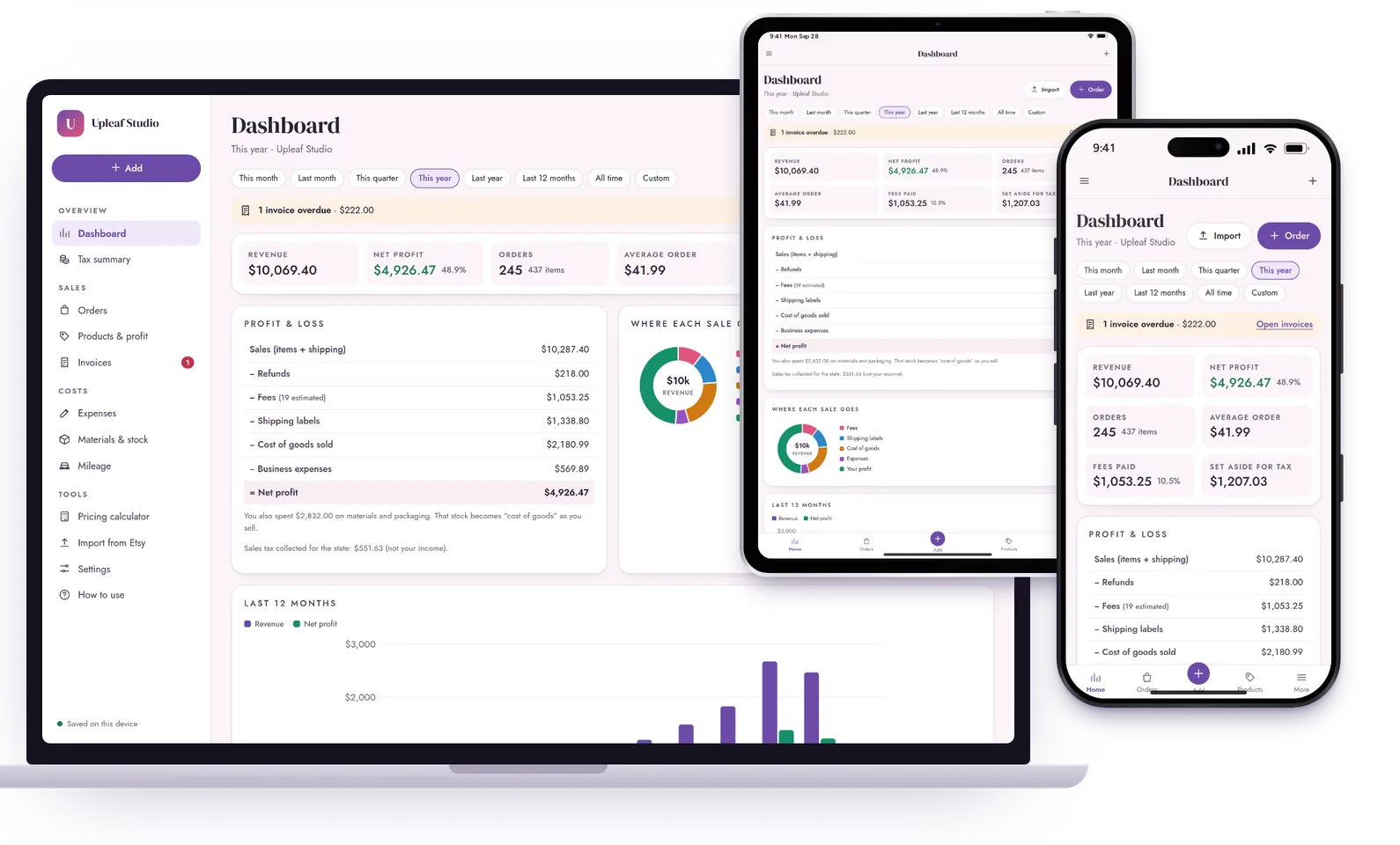
Sales in. Real profit out.
Etsy, Shopify, your website, Amazon Handmade, eBay, Instagram, markets and wholesale, all in one place.
Sales aren’t profit. What you keep is.
Fees add up quietly
Transaction, payment, listing, ads and shipping labels come off every sale.
→ Every fee is counted, with exact Etsy fees from your statement.
What does one cost to make?
Materials, packaging and your time are hard to pin down per item.
→ A simple recipe works out the cost of every item.
Tax time panic
Receipts, mileage and sales are scattered across apps and notes.
→ Expenses and mileage are sorted the way Schedule C asks.
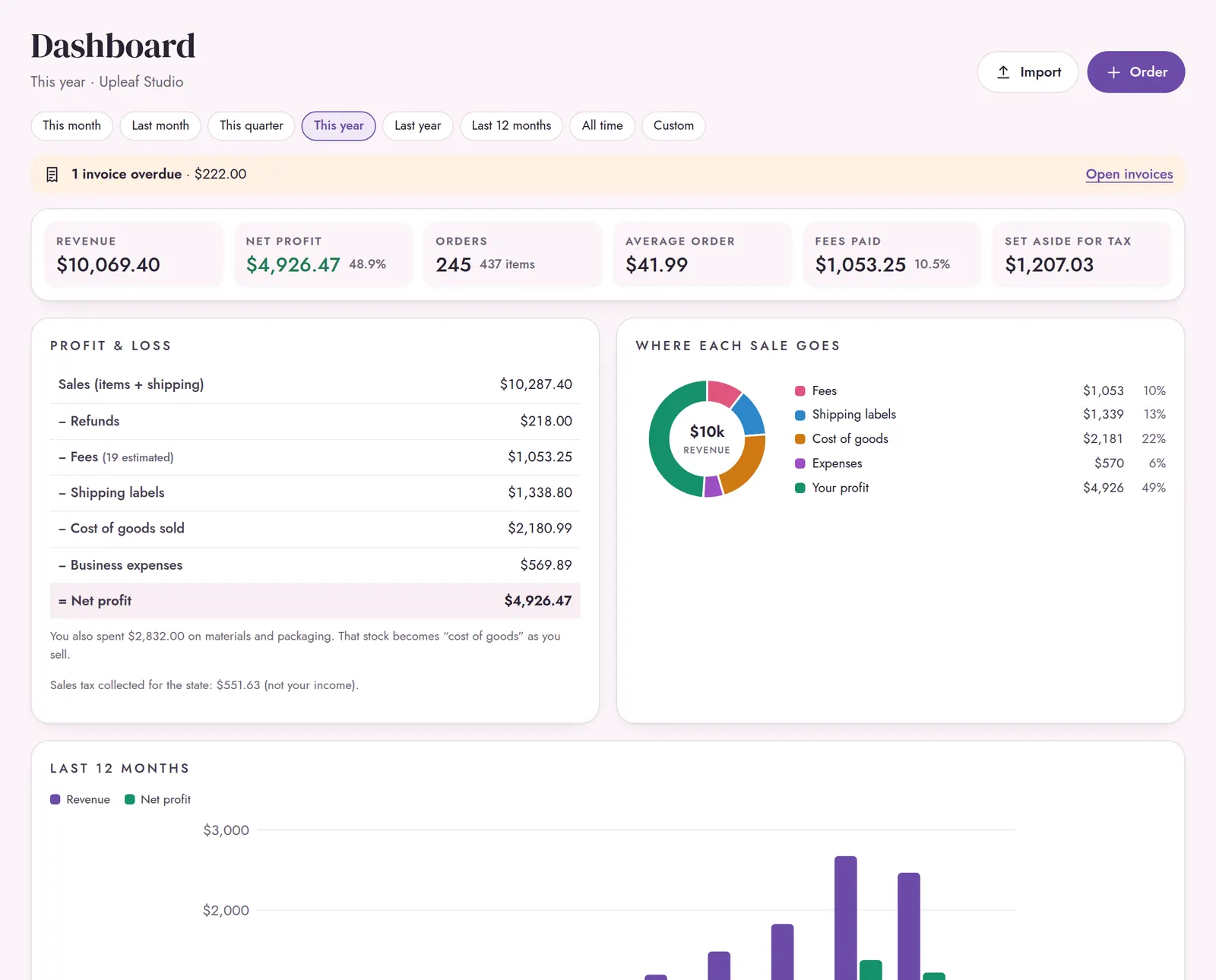
Revenue, real profit, fees paid and tax set-aside for any month, quarter or year.
Three small steps. That’s it.
Add your products
Your materials with their cost, then each product with its price and recipe.
Bring in your sales
Import your Etsy CSV, or add sales from anywhere else in a few taps.
See your real profit
Dashboard, products, stock and tax summary update themselves.
Done.
Everything your shop’s books need. No accountant speak.
Sales & fees
- Orders from every channel
- Fee rates per channel
- Etsy CSV import, exact fees
- Profit on every order
Products & stock
- Cost per item from materials
- Margin per product
- Materials and finished stock
- Low-stock alerts
Expenses & tax
- 20 Schedule C categories
- Mileage at the IRS rate
- Tax summary for the year
- Quarterly tax set-aside
Tools
- Pricing calculator
- Invoices for wholesale
- Best sellers for any period
- CSV export and backups
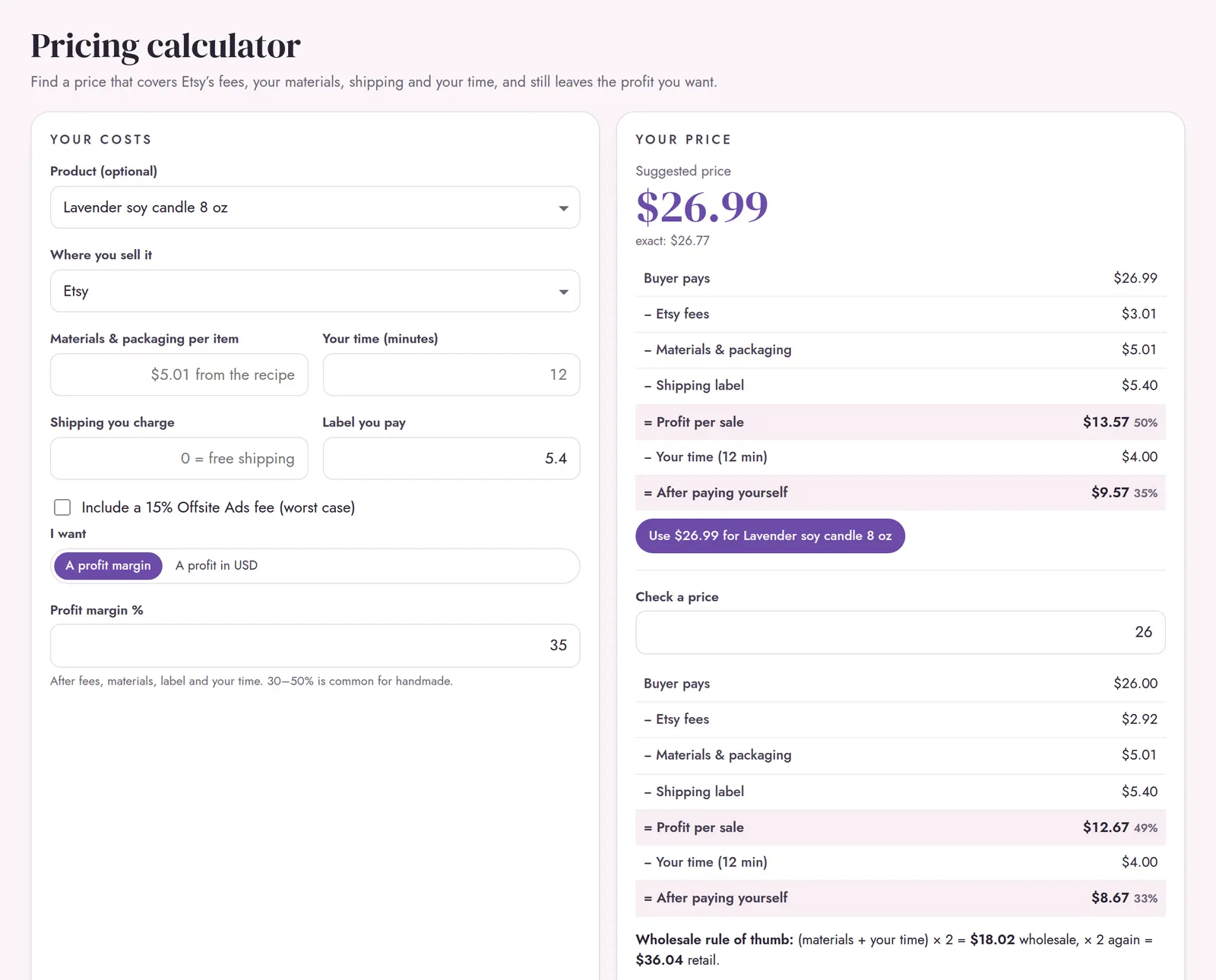
Price it right. Stop undercharging.
- Covers fees, materials and shipping
- Add your time per item if you want
- Aim for a margin or a profit amount
- Suggests a clean .99 price
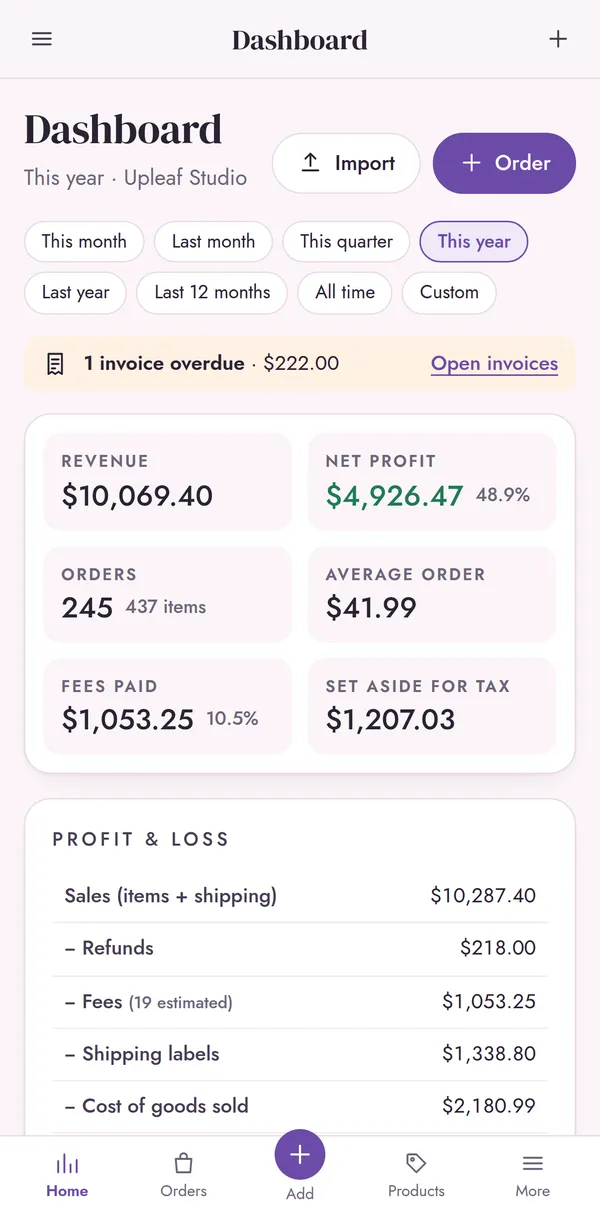
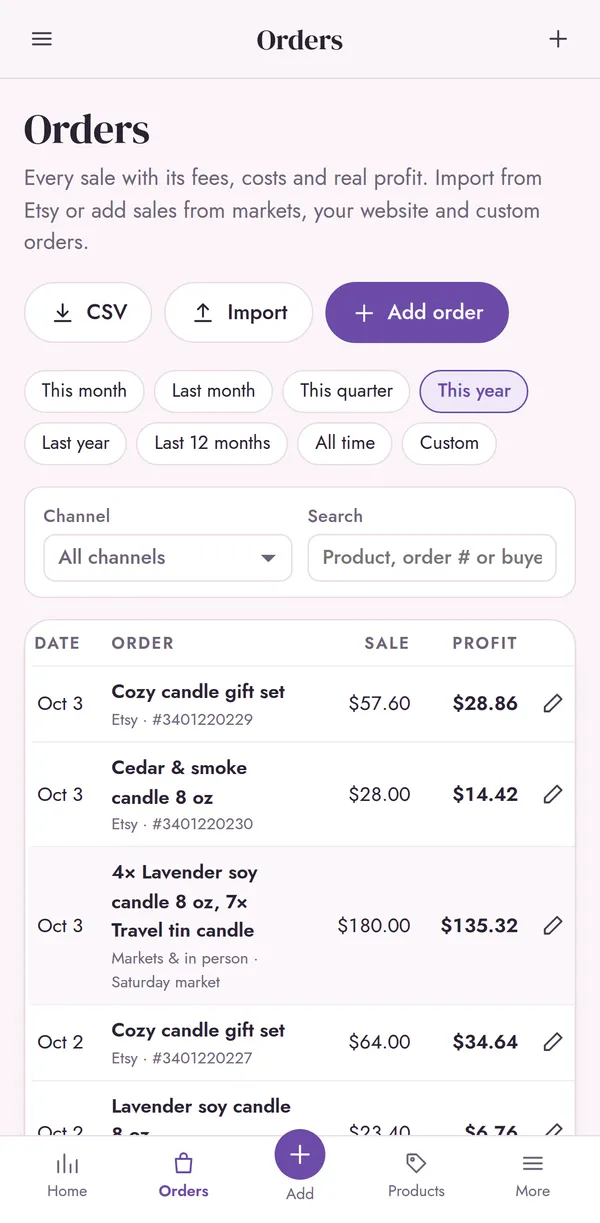
Your books, in your pocket.
- Add a market or custom sale on your phone
- Check your profit between orders
- Works offline, even at a craft fair
- Candles, jewelry, prints, crochet, digital downloads and more
Easier than a spreadsheet.
A bookkeeping spreadsheet
- Copy and paste sales by hand
- Fees guessed, never exact
- Formulas that break when you add a row
- Tiny cells on a phone
Seller Books
- Etsy CSV import in seconds
- Every fee counted on every order
- Nothing to break. It just works
- Made for phone, tablet and laptop
Your shop’s numbers are yours.
Sync
Phone and computer, encrypted on your device first. Up to 3 devices.
Backups
Download a backup file or CSV export any time.
Privacy
No shop or bank login, no account, no ads. We can’t read your numbers.
Offline
Works without internet from your Home Screen.
Launch price, paid once. Lifetime access for one business. Goes up to $37 soon.
- Seller Books on all your devices
- Encrypted sync (up to 3 devices)
- Etsy CSV import, invoices, CSV export and backups
- START HERE PDF + 14-page How-To Guide
- Free updates
Secure checkout by Gumroad · instant download
Paid once. Not every month.
Bookkeeping apps often cost $20 or more a month. Seller Books is $27 once, and it’s yours.
Good to know.
Do I need to sell on Etsy?
No. It works for any small business that sells products: Shopify, your own website, Amazon Handmade, eBay, Instagram, markets and wholesale. Etsy sellers also get CSV import; other sales are added by hand in a few taps.
Does it connect to my shop or bank?
No. Etsy sellers download two CSV files (Order Items and the monthly statement) and drop them in. They’re read on your device and never uploaded, and nobody gets access to your shop.
Is this a Google Sheets or Excel file?
No. It’s a web app that opens in your browser on phone, tablet or computer. There are no formulas to break and nothing to copy by hand. Add it to your Home Screen and it works offline, like an app.
How does it know my costs?
You add each material once with its cost per unit, then build each product from a recipe of materials. Seller Books works out the cost per item and the profit on every sale.
I sell in more than one place.
Add each channel with its own fee rates: Etsy, your website, markets, wholesale and more. Paid invoices count as wholesale sales, and the dashboard shows everything together.
Will it do my taxes?
It organises your numbers the way a US Schedule C asks for them, with quarterly set-aside amounts. It isn’t tax advice, so check with a tax professional before you file.
My shop isn’t in the US.
Change the currency and fee rates in Settings. The tax summary follows the US layout; use its totals as a starting point for your own return.
What do I get when I buy?
Two PDFs, sent instantly to your email: START HERE (your link, a QR code and your unlock code) and a 14-page How-To Guide with screenshots.
Is there a subscription?
No. It’s $27 at launch, paid once, with lifetime access for one business and free updates.
Can I try it first?
Yes. The free demo has every screen and six months of example data, with no sign-up and no card needed. It clears after 7 days.
What if I need help?
Email hello@up-leaf-studio.com and a real person answers, usually within a day. Seller Books organises your numbers; it isn’t tax or financial advice.
Know what your shop really makes.
Questions? Write to a real person.
Not sure if a tool fits the way you handle money? Stuck on setup? Send a note and you'll hear back from the maker, usually within a day.